adding/editing multiple materials
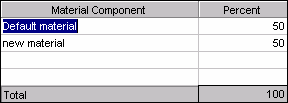
If you have the multiple materials feature, a pop up window appears when clicking the material button on the job editor screen.
To add one material, enter the name in the material field. To add multiple materials:
| · | Enter the material formula in the material field.
|
| · | Click or tab out of the material field. Another window appears.
|
| · | Enter the name of a material component. Up to four components can be entered.
|
| · | Enter a component percent for each material listed.
|
| · | Click or tab out of the component fields to close the window.
|