Changing View Options
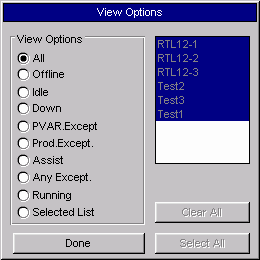
The View button opens the View Options window. This window filters the list of machines that appear on a Monitor window. The filtering is done by machine state or a selected machine list. Click on one of the circles to the left of the desired machine state. The Monitor window immediately changes its list of machines to those that are currently in the selected machine state.
Where can you find it?
| The View Options window is accessible from the Material Usage, Production Summary, Exception Summary, and Machine Performance windows.
|
What do you want to know about?
| · | Selecting a Machine State
|
| · | Selecting Specific Machines
|
| · | Selecting All Machines in a Display Group
|
| · | Clearing Machines
|
| · | Closing the Window
|