editing process variables
| · | Choose the Shop Floor menu on the main Shop Floor Configuration window.
|
| · | Choose the Machine Setup option.
|
| · | Select a machine on the window.
|
| · | Click on the Edit process option button, located on the left hand side of the window.
|
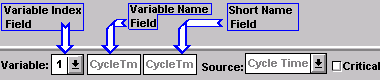
| · | Click on the arrow to the right of the Variable index field. Choose from the list by sliding the pointer down the list to the appropriate line. Release the mouse button.
|