Exception Summary
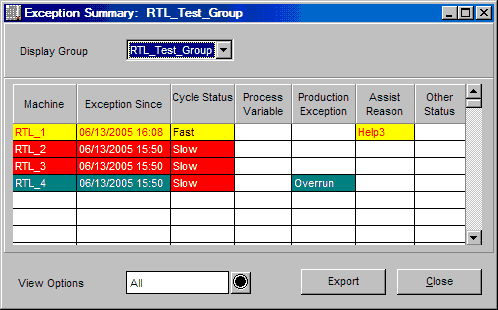
The Exception Summary window highlights machines that are experiencing performance problems. These are machines that are in an exception state for the selected display group. There is one line of information for each machine within a display group. The color of the line reflects the machine's running state. See the Machine State Colors on-line help section for further information.
If a machine is in exception, the applicable column information is displayed. For example, if a machine is in process exception, the process variable column displays the variable in violation. If a machine is in assist state, the assist reason displays in the Assist Reason column.
NOTE: More than one type of exception can be displayed at one time. The "Machine" and "Exception Since" columns both display the highest priority machine running state.
Highlighted exception states are:
| · | down state
|
| · | idle state
|
| · | off-line state
|
| · | process exception
|
| · | production exception
|
| · | assist state
|
Where can you find it?
| · | Choose the Monitor menu on the main your system window.
|
| · | Choose the Exception Summary option.
|
What do you want to know about?
|
|
| · | Changing Display Groups
|
| · | Changing View Options
|
| · | Viewing Machine Exceptions
|
| · | Closing the Window
|
|
|
|
|