Machine Usage
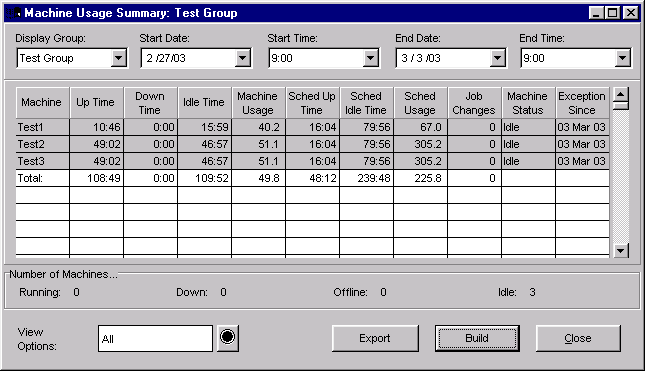
The Machine Usage window displays the machine usage and scheduled machine usage over a selected time period.
Also, the Machine Usage window provides a detailed description of the selected machine's running state. Any running state that the machine is in is displayed along with an exception time. If a process variable is in exception, this window shows whether it is a result of a higher limit or lower limit violation. Also, this window is color-coded according to the your system Machine State Colors.
NOTE: For job-to-date calculations the current shift totals are also included.
Where can you find it?
|
|
| · | Choose the Monitor menu on the main your system window.
|
| · | Choose the Machine Usage option.
|
What do you want to know about?
|
|
| · | Changing Start Date
|
| · | Changing End Date
|
| · | Rebuilding the Display
|
| · | Printing
|
| · | Changing Display Groups
|
| · | Changing View Options
|
| · | Closing the Window
|