Material Lot
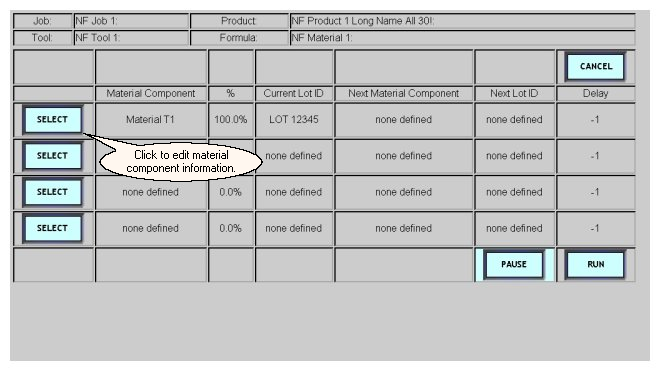
If the Material Lot Tracking feature is enabled for your system, the Material Lot screen provides an auditing feature to trace material lot usage. A material lot can be traces to a specific tote box. For each tote box or material lot change at the DCM, an event is recorded to form a lot history.The Material Lot screen displays a list of the material components and material Lot IDs for the current job. The Lot ID can be vendor or user-defined and will create an audit trail between the lots of raw material fed into the machine and the finished products produced. Several material changes can be specified to take effect as a group.
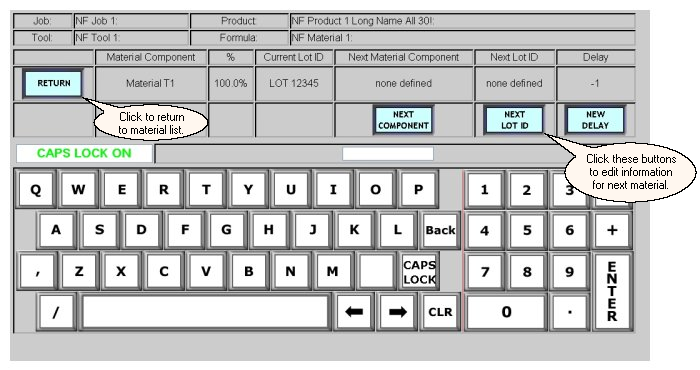
If a different raw material lot needs to be used on a running job, the "SELECT" button to the left of the material name can be used to access a typewriter screen to enter a new material name, Lot ID, and delay timer. The delay timer is used to specify the amount of time in minutes that should elapse before the raw material change is to take effect on the job.
To make your required changes, click the button below the field that you wish to update. The button for the selected field will be highlighted. Type in the new value and press enter. The value will be shown in the "Next Material Component", "Next Lot ID", or "Delay" column as specified. If a delay is not specified, the default delay timer value is set to zero. After all the required changes are entered, click "RETURN" to go back to the Material Lot list screen.
Your changes will be recorded in the "Next Material Component", "Next Lot ID", and "Delay" columns on the material list.
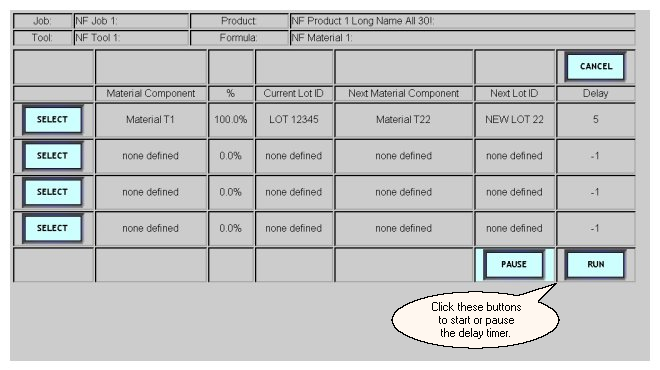
At this time, additional materials can be selected from the list to specify changes that will take effect as a group.
The timer will begin counting down when the "RUN" button is pressed on the material list screen. The change goes into effect when the timer value counts down to zero. The "PAUSE" button can be used to temporarily stop the timer count down. The "CANCEL" button will discard any pending changes. When the time expires, the current materials are replaced with the new materials and the event will be recorded in the audit trail.
Use the Lights Frame to return to the Production Summary screen.