Tool Change
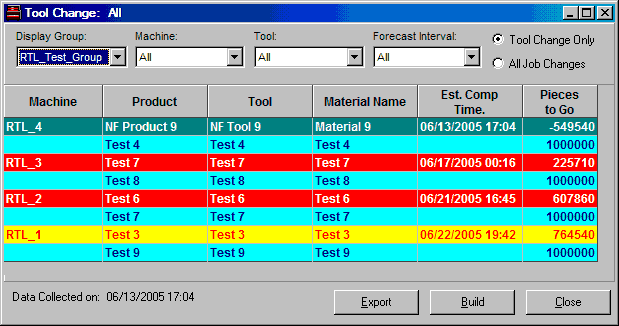
The Tool Change window provides information on upcoming tooling changes for both current jobs and queued jobs. The list of tooling changes can be filtered by display group, machine, forecast interval or tool name. The type of tooling changes displayed is selectable. The Tool Change Only and All Job Changes fields, located directly below the tool table, determine which jobs are displayed in the tool table.
If Tool Change Only is selected, current jobs and the "next" job scheduled on the same machine are displayed if each job's tool(s) are different. If a currently-running job and upcoming queued job have the same tool, neither one is displayed. (The "next" job is color-coded in blue on dark cyan.)
If All Jobs Only is selected, all jobs which meet the selection filters (display group, machine, tool and forecast interval) are listed regardless of whether or not there are tooling changes. Current jobs are listed first, followed by the next, queued job.
Queued jobs can be listed twice in the tooling table -- once as a "next" job and once as a queued job with its own "next" job. Queued jobs that are listed a second time are displayed as white on dark grey.
NOTE: This window does not automatically update information with each machine cycle. The Build button must be used to obtain the most current tool schedule.
Where can you find it?
| · | Choose the Schedule menu on the main your system window.
|
| · | Choose the Tool Change option.
|
What do you want to know about?
| · | Changing Display Groups
|
| · | Changing Machines
|
| · | Changing Tools
|
| · | Toggling Tool Change View
|
| · | Selecting Forecast Intervals
|
| · | Rebuilding the Display
|
| · | Closing the Window
|