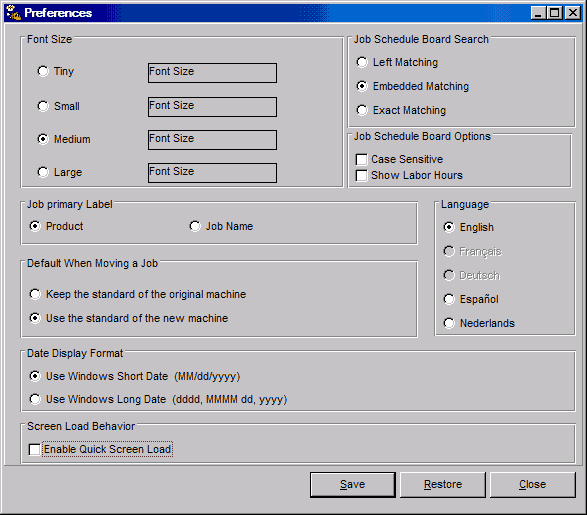
| · | Font Size -- Changing Text Sizes sets the font size for all PlantStar Panorama windows.
|
| · | Job Primary Label -- The label to use for all jobs displayed on the Job Schedule Board window can be selected. The job label field lists all jobs on the Gantt Chart by job name. The product label shows all jobs by product name.
|
| · | Default When Moving a Job - You can select what will happen by default when moving work orders or jobs from one machine to another on the Job Schedule window.
|
| · | Screen Load Behavior - This option enables the quick loading of screens. When the quick load option is enabled, a screen is loaded without retrieving the data for the selection criteria. Data is loaded after window is opened and selection is made.
|
| · | Search Criteria - The search method used on the Job Schedule Board window can be selected. There are three search methods: left, embedded, and exact. Left matching searches for records that start with a specified text. Embedded matching finds all occurrences of a text wherever it is located. Exact matching finds exact matches only. (Specific examples are provided under each method's field help topics.)
|
| · | Show labor hours displays the total number of man hours required for each shift.
|
| · | Language - This allows the users to select their language preference.
|
| · | Choose the File menu on the Monitor window.
|
| · | Choose the User Preference option.
|