Parts Count Editor
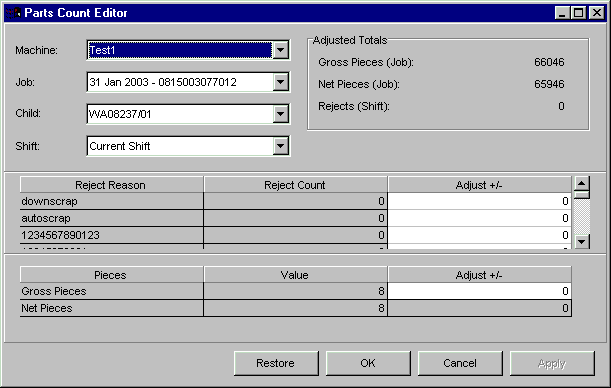
Incorrect counts for a shift and job can be adjusted from the Parts Count Editor window. This window displays two tables. The top table lists reject counts by reject reason for a specified machine, job, child job, and shift. The bottom table displays gross pieces and net pieces for the same time period. Adjustments can be made upward or downward for historical shifts and current shifts.
NOTE: If the job selected is a non-family job, the child job selection will display "No Family Jobs Defined" and the child job selection would disabled. If the machine selected is running a family job, the child job selection will be enabled and the user can select from one of the child jobs running.
Where can you find it?
| · | Choose the History menu on the main your system window.
|
| · | Choose the Parts Count Editor option.
|
What do you want to know about?
| · | Changing Machines
|
| · | Changing Jobs
|
| · | Changing Child Jobs
|
| · | Changing Shifts
|
| · | Adjusting Reject Counts
|
| · | Adjusting Gross or Net Pieces
|
| · | Saving your Changes
|
| · | Undoing your Changes
|
| · | Closing the Window
|
|
|