Material Usage
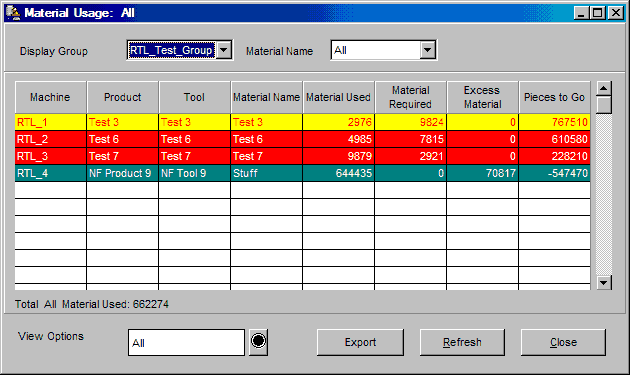
The Material Usage window provides a summary of the amount of material used, excess material, and material requirements for each material component of a job. All calculations are based upon the current job. Material usage statistics are primarily based upon net pieces or gross pieces, part weight, and a job's standard multiplier. The handling of reject parts, whether runners are re-fed, determines whether usage and excess material calculations must take shot size into consideration.
There is one line of information for each material component attached to the current running job on a machine. The window's information can be filtered by display group, machine state, and material component. The color of each line reflects machine states. See the Machine State Colors on-line help section for color-coding.
Where can you find it?
| · | Choose the Monitor menu on the main your system window.
|
| · | Choose the Material Usage option.
|
What do you want to know about?
|
|
| · | Changing Display Groups
|
| · | Changing View Options
|
| · | Changing Material Components
|
| · | Closing the Window
|