Process Select
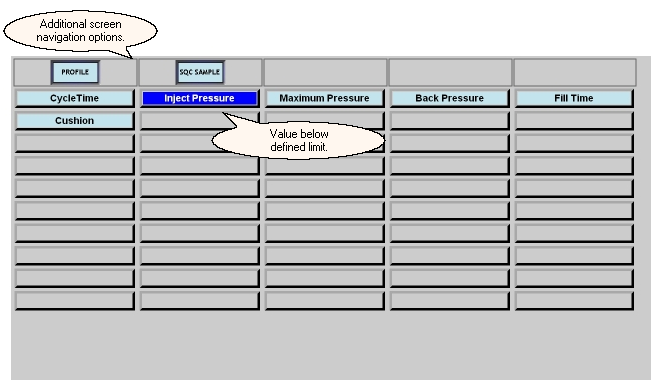
The Process Select screen allows for monitoring up to fifty process variables that may be defined for the currently running job on the selected machine.It provides a quick visual reference to monitor the process exception state for a machine. If the last value recorded for a process variable is above the higher limit or below the lower limit defined for the job, that process variable is highlighted according to the following default color scheme:
| · | Red - value is above the higher limit
|
| · | Blue - value is below the lower limit
|
If a process variable exceeds its defined limits for the job, the machine will be put in the process exception state for that cycle which will be reflected by the color conventions used in the lights frame.
Pressing a process variable button will display the Process Table screen for the selected variable.
The Process Select screen also provides quick access to the Profile, and SQC Sample screens for a specified machine by using the buttons at the top left. Use the Lights Frame to return to the Process Summary screen.
What do you want to know about?
| · | Selecting a process variable to see the last fifty values
|
| · | Displaying profile information
|
| · | Taking an SQC Sample
|