Reject Update
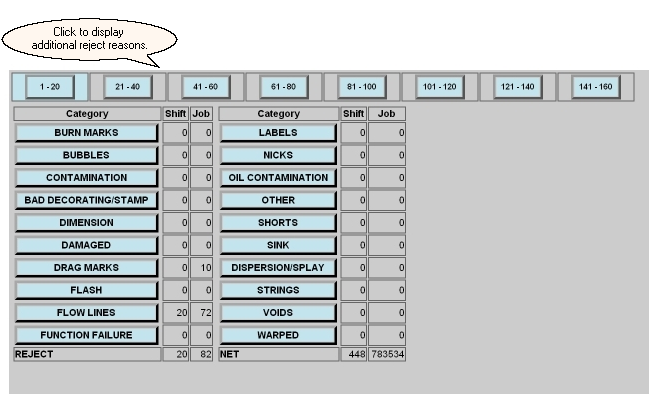
The Reject Update screen provides a summary of rejects that have been assigned to each defined reject reason for the current job. It also provides a means for the operator to add or subtract rejects for a reject reason. For a family job, the parent screen will display an accounting summary for each child.Twenty reasons are listed on a reject screen. For installations where the extended reject option has been purchased, the buttons along the top of this screen will allow navigation to additional reject reasons.
 l
l
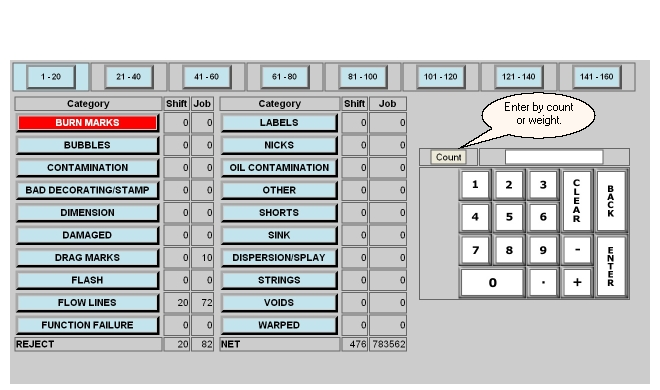
Pressing one of the reject reason buttons will highlight that reason and a keypad will be presented. The amount of rejects to be assigned to that category can then be entered. Negative numbers can be entered to subtract rejects from a category. In addition to the actual quantity of rejects, the part weight can be used so that a given weight can be entered as rejects. This weight will be divided by the part weight so that an actual part count can be automatically rejected.
The Reject Update screeen for a family job displays an accounting summary for each child on the parent screen. The background color of the row in the summary table reflects the machine state for the child.

This parent screen can be used to reject an entire cycle of parts as shown below. Using the menu frame to navigate to a child job allows rejects to that specific part as described above.
