Down Reason Sets
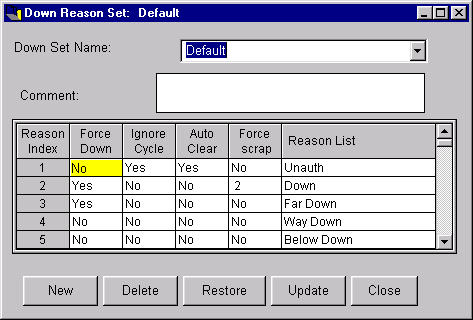
The Down Reason Sets window lets you add, change or delete a down reason set. Defining down reason sets enables PlantStar Panorama to report a machine's down time and down frequency by a defined reason. Down time statistics are collected using shift-to-date data for a current job or historical job. Down reason sets are associated with a machine from the Machine Setup window.
You can define up to twenty (20) down reasons for each down set. Down reason number one and two are pre-defined by PlantStar Panorama in terms of what they do and mean.
NOTE: An extended down and reject reason option can be purchased from PlantStar Panorama. This will extended the down/reject limit to one hundred and sixty (160) down/reject reasons for each set.
Down Reason One: The first reason is the default down reason. Time is accrued to this reason when a machine is down and the operator has not selected a specific reason. A post-down delay period can be set, though, from the Machine Setup window that delays the accruing of "unspecified" down time to Down Reason #1.
Down Reason Two: The second down reason clocks actual setup time. PlantStar Panorama compares this time with a job's standard setup time.
NOTE: A machine is considered down under the following conditions:
| · | The machine is cycling so slowly that the actual cycle time is longer than the down time threshold specified in the current job.
|
| · | The operator has selected a down reason that 'forces' the machine into a down state.
|
Where can you find it?
| · | Choose the Sets menu on the main Shop Configuration window.
|
| · | Choose the Down Reason Sets option.
|
What do you want to know about?
| · | Selecting Reason Sets
|
| · | Creating Reason Sets
|
| · | Renaming a Reason Set
|
| · | Deleting Reason Sets
|
| · | Saving Reason Sets
|
| · | Undoing Your Changes
|
| · | Setting Down Reason Flags
|