DCM Setup
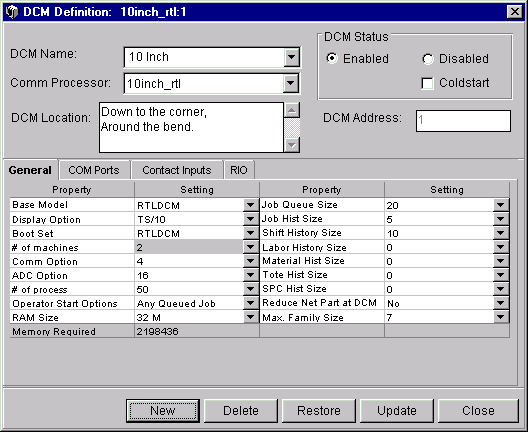
The DCM Setup window lets you add, change or delete DCM information. This window configures a DCM to suit the shop floor environment. The software configuration must match the physical components within the unit. For instance, a DCM can only be configured for 16 analog channels if the optional analog board was purchased and installed. This window also allocates the on-board memory (RAM Size).
At least one DCM must be defined for your plant. All defined DCMs are displayed upon the opening of this window. If no DCMs have been defined, then the window appears blank.
NOTE: Machines are assigned to DCMs from the Machine Setup window.
Where can you find it?
| · | Choose the Shop Floor menu on the main Shop Configuration window.
|
| · | Choose the DCM Setup option.
|
What do you want to know about?
| · | Selecting a DCM to View
|
| · | Adding a DCM
|
| · | Updating a DCM
|
| · | Deleting a DCM
|
| · | Enable a DCM
|
| · | ColdStart a DCM
|
| · | Changing General DCM Settings
|
| · | Changing COM Port Settings
|
| · | Changing Contact Input Settings
|
| · | Changing RIO Settings
|
| · | Saving your Changes
|
| · | Undoing Your Changes
|
| · | Closing the Window
|