Work Orders
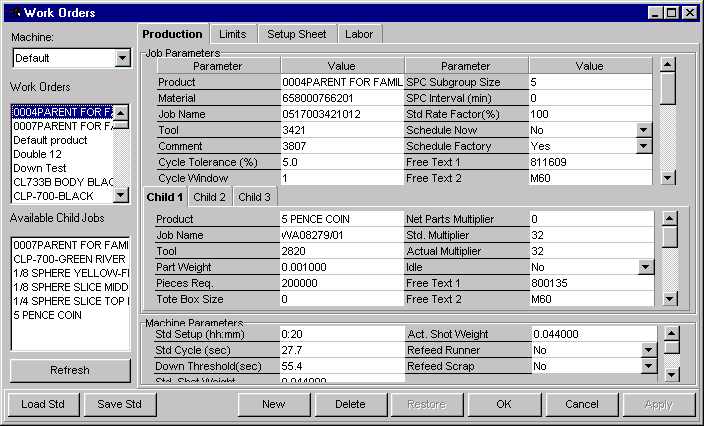
The Work Order window lets you add, change or delete work orders. A list of work orders is displayed on the left side of the window upon opening. If no work orders have yet been defined, the work order list will be empty.
Work Orders are essentially jobs that have been defined but not yet scheduled. In order to schedule jobs, you must first create a work order. A work order consists of a set of job parameters. These parameters define the job. They include such things as the number of pieces required and the standard rate at which the pieces will be produced.
A list of existing work orders is displayed on the left side of the window and job parameters are on the right. Additionally, the process variable, profile, setup sheets, and manning factor parameters are available from the Limits, Setup Sheet, and Labor tabs, located in the top portion of the window.
A work order may be created manually by entering the parameters or by loading in a product standard.
NOTE:
| · | Work orders can also be created and edited from the Job Schedule Board window.
|
| · | You must have the proper privileges to enter this menu option. (See your System Administrator if you do not have the proper privileges.).
|
Where can you find it?
| · | Choose the Schedule menu within Monitor.
|
| · | Choose the Work Orders option.
|
What do you want to know about?
| · | Creating Work Orders
|
| · | Selecting Work Orders
|
| · | Changing Machines
|
| · | Editing Production Parameters
|
| · | Editing Process and Profile Limits
|
| · | Editing Setup Sheets
|
| · | Editing Labor Manning Factors
|
| · | Loading a Product Standard onto a Job
|
| · | Saving Jobs as a Standard
|
| · | Creating Unassigned Child Jobs
|
| · | Deleting Unassigned Child Jobs
|
| · | Adding Child Jobs to a Work Order
|
| · | Removing Child Jobs from a Work Order
|
| · | Assigning Child Jobs
|
| · | Deleting Work Orders
|
| · | Saving your Changes
|
| · | Undoing your Changes
|
| · | Refreshing the Lists
|
| · | Closing the Window
|
|
|